


Desertcart purchases this item on your behalf and handles shipping, customs, and support to Cameroon.
🖱️ Elevate your workspace with the Surface Mouse — where style meets seamless control.
The Microsoft Bluetooth WS3-00001 Surface Mouse combines sleek, ergonomic design with Bluetooth 4.0 wireless technology, offering precise 4-button control and broad OS compatibility. Crafted with a durable metal scroll wheel and ambidextrous shape, it delivers comfort and style for professionals on the go or at the desk.
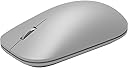


| ASIN | B01MG4JB12 |
| Additional Features | Bluetooth |
| Antenna Location | Office |
| Best Sellers Rank | #2,301 in Computer Mice |
| Brand | Microsoft |
| Button Quantity | 4 |
| Color | silver |
| Compatible Devices | Personal Computer |
| Connectivity Technology | Bluetooth |
| Customer Reviews | 4.5 out of 5 stars 906 Reviews |
| Enclosure Material | Metal |
| Global Trade Identification Number | 00889842103090 |
| Hand Orientation | Ambidextrous |
| Hardware Platform | Laptop, PC |
| Included Components | Mouse, batteries, quick start guide, warranty guide |
| Item Dimensions L x W | 4.53"L x 2.52"W |
| Item Type Name | Microsoft Surface Mouse |
| Item Weight | 3.2 ounces |
| Manufacturer | Microsoft Surface Accessories - PC |
| Mfr Part Number | WS3-00001 |
| Minimum Required Operating System Version | Windows 10 |
| Model Name | Surface |
| Model Number | WS3-00001 |
| Movement Detection | Optical |
| Movement Detection Technology | Optical |
| Number of Batteries | 2 AAA batteries required. (included) |
| Number of Buttons | 4 |
| Operating System | Windows 10 |
| Power Source | Battery Powered |
| Range | 10.0 meters |
| Special Feature | Bluetooth |
| Style Name | Modern |
| UPC | 889842103090 |
| Warranty Description | 1-year manufacturer warranty |
I**E
Feels good, operates well, minimalist, what you see is what you get.
When I bought this mouse a couple weeks ago I had done enough research into it and knew exactly what I was getting prior to buying it: a very simple mouse with no frills or extras to it. The aesthetic is what mattered to me and was a joint purchase with the Surface Keyboard. The major areas that actually factored into my rating were how well it operated, how it felt in the hand, and how the buttons and scroll wheel felt. Review may be modified later once battery power has been adequately determined since it's too early to tell. Operation - No real operational issues therein. I do feel it's a little bit sluggish once in a while when it's been sitting idle for a bit and then moved, but this is expected behavior of nearly all Bluetooth devices that have been sitting idle. The thing works as a standard Bluetooth device and will pair with pretty much everything, be it your phone, tablet, Mac, or regular PC/laptop with Bluetooth capability. Feel - The contours feel pretty good in the hand and the weight just right, if only on the light side of things. It glides pretty well over most surfaces, but I would still recommend a mouse pad for best results. Buttons - Clicks feel just right with a light press to operate while still resting one's fingers on both without fear of mis-clicking something. Scroll Wheel - The wheel is the only thing made of metal on it. The scrolling has good feedback, but the middle-click feels a little tight. This is probably intended in order to prevent accidental clicks while scrolling. In the end, it's just a very standard, very simple designer Bluetooth mouse. What you see is what you get here and the aesthetic and feel would really need to be the only reason for buying it. It's perfect for an office environment and/or those who are seeking to create a minimalist desk, especially when paired with the Surface Keyboard.
J**T
Beautiful Look And Feel
The fit and finish is on par with the Apple Magic Mouse 2, and maybe even a step above. It doesn't have the aluminum base, but the plastic is finished in a finely matte frosted treatment that makes it feel almost like the Alcantara material they use for the Surface Keyboards. The metal scroll wheel literally feels like a high end watch crown. Like smooth, heavy, well-engineered metal. If you're like me, you'll find yourself scrolling up and down even when you don't need to. I also really enjoy the aesthetic of both this mouse and the companion keyboard. They look timeless and modern atop a desk - I just wish they made the keyboard in a mechanical version. I've tried gaming mice in the past and found them to be either too bulky, over-engineered, too small, or some combination of the three. This mouse feels large enough to have been designed for actual human hands, without having too much bulk on top. It's not a gaming mouse, but I have no issues gaming with it at all. It also happens to be as precise and smooth as any gaming mouse I've ever used - and doesn't require any proprietary software to get it tuned in. It works right out of the box.
B**H
Highly recommended for those who want to match the look and feel of the Surface line
All of my devices have minimal USB ports available (SP4, SB, Lenovo Helix) and Bluetooth mice have become a necessity in my life. Before purchasing the Surface mouse I used the Sculpt Comfort, designer Bluetooth, and Arc Touch SE as my mice and they were all quality options but didn't match the look and feel of the Surface line. I did my research and found the designer Bluetooth mouse is the precursor to the Surface line but this new model has a higher internal hardware grade and more desirable aesthetics (IMHO). Over the last month I've come to appreciate the slightly larger form factor as it fits more comfortably in my hand and appreciate the matching Surface design. Pros: Quality build and higher end technical components, long battery life, uniform Surface design aesthetics. Cons: higher price than other mice with similar functionality (paying for looks and Surface name), requirement to pair again if switching devices (a Bluetooth protocol requirement that exists on all Bluetooth mice)
P**S
The Surface Mouse OR the Sculpt Mouse?
I spend a significant amount of time with my mouse in my hand, whether on a desktop, a laptop, or now (hooray) on a Surface tablet. Touchscreens and scroll pads are fine for casual everyday use but nothing beats a mouse for productivity, whether while working with spreadsheets, long lists or graphic editing. I go through computer mice at a ridiculous pace, they rarely last more than 6 months. I used to be married to Logitech mice because of how they feel in my hand but I got to the point of being dissatisfied with their build quality and poor support. The Sculpt Bluetooth model was the first Microsoft mouse I bought in many years and I was so pleased with it I bought two more of them. I was only slightly displeased that the scroll wheel didn't feel as solid as the metal one on my Logitech and the fact that the Microsoft was slightly smaller than I preferred. So I was excited to see this new model from Microsoft in a minimalistic shape and now featuring a metal scroll wheel and the promise of having a more comfortable shape. I this new mouse a lot. The extra weight of the metal scroll wheel is much more conducive to quick flicks of the finger to send the cursor through numerous spreadsheet cells at a time or several web pages, without overshooting. As far as the shape, let's be realistic ... everyone will have a different idea of what feels good in their hand. My preference is toward larger. The shape of this Surface mouse is not larger but different and after a little getting used to, it feels pretty solid. While this is sold as a mouse designed for the Surface there is no reason it can't be used for any Bluetooth-enabled device. It is backward compatible with previous Bluetooth protocols. I carry the mouse with me and use it with my desktop, laptop and tablet without batting an eye, it just works. Microsoft also promises longer battery life. That hasn't been an issue with any of their mice I own, they seem to run forever on a set of batteries, but I will gladly take longer battery life. The $50 price is about right if you are used to paying more for style but honestly the mouse isn't that much different from the essentially the Sculpt mouse dressed in basic black that is often discounted for less than half of what the Surface Mouse sells for. SOME THINGS TO KNOW While the length and width dimensions are almost identical the Surface mouse is more of a rectangle with rounded corners while the Sculpt Mouse is more egg shaped. The Sculpt Mouse seems much taller, but in reality it is only taller by about ¼”. It just “seems” much larger. The Sculpt Mouse also seems much heavier and in fact it is, the actual weight is 4.65 oz vs the Surface mouse at 3.20 oz. Other differences is that the Sculpt Mouse has the blue “Windows” tab that I thought was so cool when I bought it and then ended up never using because I was always brushing against it accidentally. Unlike the Sculpt Mouse three active buttons on the Surface Mouse (left click, right click and scroll wheel click) require a bit more pressure to activate. I think that’s a good thing … one of the most frustrating things about the Sculpt Mouse is that I was always clicking the left button by mistake by simply resting my finger on it. Not so with the Surface Mouse. On the bottom of the Surface Mouse there is only one tiny on/off/pair button, no slide switch to turn the mouse off. I like that the ring around the entire perimeter of the bottom of the Surface Mouse is a Teflon-like glide surface, it keeps the mouse from wiggling side-to-side and also helps prevent gunky build-up on the glide pad that plagues so many mice.. Finally, a subtle touch, the battery cover is magnetized. That’s can be a minor convenience to avoid a fragile plastic clip from breaking some day but it can also be a very small concern if you happen to lay your mouse on top of a credit card or something else with a mag stripe. Other than physical feel of the device what’s most important about any mouse is how well it tracks. As a photographer/graphic designer I have a graphics tablet handy for any artistic-related tasks but it seems there is always a need at times for a mouse to track with high precision. The Surface Mouse is more precise, especially when tracing complex curves, but just as important is that the Bluetooth signal “wakes up” fractionally faster than the Sculpt Mouse so it doesn’t have that miniscule lag time before the cursor moves. It is evident that Microsoft invested a little more into designing the Surface Mouse than the Sculpt Mouse and I dare say a lot of other lower-priced pointing devices I use. I like this mouse enough for it to earn 4-stars but it’s just not THAT good that it should cost $50, hence the price is one strike against it.
A**R
Great to use for any computer!
I personally love this mouse! It is really ergonomic and the surface texture feels good in the hand. The color also works really well with the surface studio computer and keyboard. I tend to like a simple mouse that doesn't have too many functions and this is very minimal and easy to use. The scroll wheel feels really nice as well as the click feel, not to mention the sound is a good click that isn't too loud. The battery life is great and very rarely need to change the batteries, maybe once or twice a year if you are using it a moderate amount. I don't do a lot of gaming with it, mainly work. That being said, I'm sure it would be great for casual gaming if needed. Otherwise it is a great all-around mouse that would be a great addition to any desk setup.
M**T
PERFECT mouse
One of my biggest pet peeves is a dirty, sticky mouse. After 8 hours of grueling work, most of the mice I use at the office end up sticky and slimy. Every time I'd hear "here, let me show you" followed by a co-worker grabbing my computer mouse, I'd wince in embarrassment. If you could only see how much masking tape I used to cover that disgusting slime coating on my mice. Sometimes it would get so bad that one my drive home from work, I'd transfer this shiz onto my car's steering wheel! After suffering long enough, I decided to give this mouse a try. Low and behold, this thing is a god-send. The battery life is excellent, pairing was easy, the left and right mouse-click noises are satisfying and pointer accuracy is top-notch...most importantly, no more mystery mouse slime. 5 stars for sure from me!
A**N
Easy to use
There are no disadvantages except that it is expensive.
B**R
A really nice looking version of the free mouse that comes with desktops.
Update #2 (first update at the bottom): I wanted to update my impressions about the feel of the mouse, and also a slight problem I've discovered with it in some scenarios. I also wanted to add a few photos of it next to the new Surface Ergonomic Keyboard, which hadn't been released at the time of the initial review. When I first wrote this review, it was after about 24 hours of ownership, 16 of those or so would have been use. For a simple mouse like this, I didn't really think continued use would have much to add so I didn't delay writing the review. At the time, I gave it two stars because it felt very uncomfortable to me. Perhaps a week later, after adjusting my seating height and getting more used to it, I updated it to three stars because it was becoming much more comfortable. Now, several weeks later, I actually find it quite comfortable. It's certainly not the most comfortable mouse I've ever owned (perhaps that'd be the Deathadder or the MX Master), but having adjusted to it, I would definitely say I find it comfortable now. It's still small, so large guys may find it to be a bit unnatural to hold, but for my 5'10 average sized self, it's grown on me. So I wanted to address the comfort issue. I have discovered a slight problem with the mouse though, or at least, a problem for people who need a great deal of precision (Photoshop, first person shooters, etc.). It takes quite a bit of travel to move the cursor one notch over to the left or to the right if done very slowly. This doesn't happen with my other mice and it doesn't even happen to this mouse in vertical movement (ironically, given wide screen ratios, this is the one you need less precision on). It's 100% repeatable on my particular mouse. It doesn't feel like a bug. It seems too consistent to be a bug. For reasons unknown to me, Microsoft seems to have intentionally dialed in a sort of dead zone for it to ignore minor lateral/horizontal input before it moves. For casual users, this makes no difference at all, and you'll likely never even notice. But in graphics, or certain kinds of video games, you really want to get to a single pixel over and it's quite difficult, at least if that pixel happens to be on the left or right of wherever you currently are. These two observations balance themselves out, in my view, so the three star rating remains (for now). Ultimately, this is a mouse that was designed from day 1 to be a good looking casual computing tool. It is an upscale version of the very affordable Designer mouse and it shows. The thing is, because this is a Surface accessory, and because it will eventually be packaged with Surface Studio computers, I can only understand this to be a product aimed at professional users and so I have to evaluate it for their needs. For them/us, this unfortunately is not really up to the task. To get a mouse that looks pretty good next to your Surface Keyboard and Dial (both of which I'm using right now), I recommend the Logitech MX Master in "Stone" color. I liked that mouse so much I bought two of them, the black/bronze and after getting the Surface Keyboard, the Stone to match. Now, having observed the confusion on my initial review in the comments, I'm inclined to add a separate conclusion for casual users who just like how it looks. For you, I'd give it four stars. It does what it needs to, it's comfortable (after an adjustment period, anyway), it's got a good battery life, and arguably most importantly in this segment, it looks good. Do keep in mind, however, you can get almost the exact same mouse for about half the price, albeit in black, with the Designer Mouse. You can also get it as part of a solid value package deal with the Designer Keyboard, which is also pretty similar to the Surface Keyboard (non-Ergonomic), although the Designer Keyboard is a bit more space conscious than the Surface version. So you can have a matching set for quite a bit less, although it'll be in black. (Original, unedited review) I purchased all of the new Surface peripherals that are available today for my desktop and Surface Pro 4, including this mouse. I mostly bought it because I thought it looked beautiful in photos For reference, I mainly use an MX Master for my workstation and a Razer Ouroboros for gaming. Unfortunately, it's been a bit of a disappointment. First off, it looks like it's milled from a block of aluminum, and it actually does look great in real life, but it's just plastic. But I can get over that--metal might even be cold to the touch and a downside. The real problem is twofold: the lack of buttons and the size/shape. The lack of at least a forward and back button is pretty much unforgivable in a device aimed at professionals. On my MX Master, I've got three buttons (back, forward, and task view) as well as a lateral scroll wheel, all of which I use. I can settle for a forward and back button, but alas, you get none. The second problem is even more of an issue. It's far too small for my 5'10 male hands. I'm basically enveloping the whole mouse with my hand. I actually prefer ambidextrous mice and use a claw grip, so in theory this is set up for me, but my fingers are hitting the very outside of the buttons. There is a bright side though. Microsoft doesn't officially say this mouse will work on glass, but having studied the sensor beforehand, I theorized it did, so I went ahead and tried it on my glass table, where it worked fine. I can't guarantee this will work on thinner glass, but it's promising. Ultimately, this mouse is, I'm sad to say, a really nice looking peripheral that really has more in common with the free opticals that come with desktops these days. I suppose that shouldn't be too surprising since it's just an aluminum-painted version of the black "Designer" mouse that goes for quite cheap here on Amazon. Not only is it skippable, I'd say that if you're going to be using your computer for 8 hours a day, as I'm assuming future Surface Studio users will be, it's almost mandatory to avoid. I might keep it around as a portable mouse for my SP4, but it's back to my MX Master for now. Update: I've spent a little more time with the mouse and decided to move it to 3 stars. I was in between 2 and 3 to begin with, but what really changed it for me was adjusting the height of my office chair, specifically lowering it an inch or two. I'm realizing that with this long, but thin, mouse body I shouldn't be approaching it from the same angle as my chunky "pro" mice. Coming at the mouse sort of dead on makes it worlds more comfortable. It's still too small for me, and that's a problem because I think I represent a pretty ordinary size, but it's no longer very awkward to use. I'd also like to emphasize that this is a pretty good sensor from what I'm feeling. I do use mouse pads in my office, basically my entire desk is covered in Corsair black pads, but it has performed what MS said it would in terms of working well on a variety of surfaces (no pun intended). Last night after writing this review, I decided to give it another short on my Surface Pro 4, using it on my bed cover before going to sleep and it tracked just fine there too, so between glass and uneven bedspreads, this should work pretty much anywhere you would hope it would. It's not all rosy updates though. I decided to give Deus Ex: Mankind Divided a shot with this mouse, thanks to my newfound epiphany on seating positions. It's passable, and in fairness, it's not intended for gaming, but I'm going to say it's pretty below the bar here.
M**B
Connection issues
This piece may be defected !
A**P
Loved it
Premium quality and highly responsive. But if you are inactive for a few minutes I think it goes in some kind of sleep mode to save the battery. Then you need to move the mouse a little to awake it.
G**N
Great Bluetooth mouse
Great mouse. It is on the lightweight side but it is perfect for me. Batteries add enough wait so you still feel the mouse. The mouse is made of good plastic. It tracks great. I love the scroll wheel, it is metal, very smooth and quiet. Bluetooth pairing was simple and works flawlessly for me. Love having a Bluetooth mouse for my laptop, no more dongle!
V**M
No me arrepiento de pagar el precio del periférico
Un muy buen producto, cómodo, fácil de usar, elegante. Un ratón caro pero que vale cada peso por su calidad.
T**J
It just connected so well with my Surface!
Looks elegant and is fit for purpose.
Trustpilot
1 week ago
3 days ago