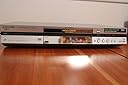
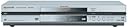
๐ฌ Upgrade your home theater game with Panasonicโs powerhouse DVD recorder!
The Panasonic DMR-E80H is a versatile DVD player and recorder featuring an 80GB hard drive for extensive storage, progressive-scan 720p output for crisp HD visuals, and Time Slip technology allowing live rewind during recordings. It supports multiple disc formats including DVD-RAM and MP3 CDs, making it a robust solution for digitizing and enjoying your media collection with professional-grade quality.
| ASIN | B00009KXA3 |
| Analog Video Format | NTSC |
| Audio Output Mode | AC-3 (Dolby Digital) |
| Best Sellers Rank | #592,129 in Electronics ( See Top 100 in Electronics ) #105 in DVD Recorders |
| Brand | Panasonic |
| Color | Silver |
| Compatible Devices | Television |
| Connectivity Technology | RCA |
| Connector Type | RCA |
| Controller Type | Remote Control |
| Customer Reviews | 3.6 out of 5 stars 45 Reviews |
| File Format | MP3 |
| Global Trade Identification Number | 00037988407088 |
| Item Weight | 11.4 pounds |
| Manufacturer | Panasonic |
| Media Type | CD, DVD |
| Mfr Part Number | DMRE80H |
| Model Name | DMR-E80H |
| Model Number | DMR-E80H |
| Other Special Features of the Product | Progressive Scan |
| Resolution | 1280ร720 |
| Special Feature | Progressive Scan |
| Supported Audio Format | MP3, Dolby Digital |
| Surround Sound Channel Configuration | 5.1 |
| UPC | 037988407088 |
| Unit Count | 1 Count |
| Video Encoding | MPEG-2 |
| Video Output Resolution | 720p |
| Warranty Description | 1 year warranty |
J**R
I love this machine!
I've had this machine for over 2 years and I love it. It's completely eliminated any need for me to EVER use video tapes for any reason. Simple and logical to use, record everything to the HD first, then edit it nice and neat and burn to disc. I wanted to put in a review though specifically to comment on what some other reviewers have said. Someone said they encountered the 'recovery' & 'bye' issue when a burn failed, and that happens sometimes. Especially if you clog up the HD with files, it can have a minor heart attack, but that doesn't mean the machine is broken, it doesn't need to be fixed. Just erase the problem file and it'll be fine again, it's very rare that this happens to me, and it's a minor annoyance compared to all the wonderful things this machine does. Clear off the HD and maybe reformat it and it'll be golden again. Sometimes if gets really confused and has a serious breakdown, I've found I might need to unplug it to just get it to quit trying to figure out what went wrong and reset, but that always works, and once it recovers it's fine again. This is a complex machine, but it's very robust. Regarding HD failure, that DID happen to me. All hard drives are susceptable to eventual failure, and I ran that thing into the dirt with heavy use, and it eventually failed completely. But you don't need to pay some electronics shop jerk $320 to fix it, that's a rip off. There's absolutely nothing unusual about the HD in these things. I just opened up the case, pulled out the HD, went to CompUSA and bought a new one (got a 120 of the same manufacturer cause they were out of 80's), plugged it in, closed it up, machine recognized it immediately, formatted it, and it's been working like a beauty ever since. Total fix cost was less than $100 to buy the new drive. My machine has been in heavy use for 2 years, and it's performed like a champ. It's needed a bit of babying sometimes, but 99.5% of the time it's the best recording machine I've ever had, and the other 0.5% of the time you just have to let it recover, perhaps give up on a file or two if they got corrupted (VERY rare, but the machine isn't broken). I won't claim it's perfect, but it's SO good the occasional weakness is so minor that I can't get upset by it. Hope this helps some of those who already have this machine. Don't give up on it at the tiniest hiccup. It's a tough machine and does a fantastic job if you stick with it. Oh yeah, one last cool thing I discovered about this machine. Near as I can tell the Panasonic models of DVR/DVD recorders are the only ones that maintain 640 x 480 resolution at LP speed. All the other brands start cutting out lines to save data space below SP, but the Panasonic stays full res, with perhaps a few more encoding artifacts, but I'd rather have some extra coding artifacts than dump entire lines of resolution. Most things look great even at LP, which allows 4:20 to fit onto a single DVD.
"**"
Excellent, Versatile Recorder
I watched DVD recorders for a long time, waiting for them to come down in price. This recorder advertised the functionality I was looking for, and was much more reasonably priced than any of its counterparts. So, I took the bait. I was not disappointed. This machine has essentially replaced my VCR, and I am now in the process of transferring several hours of analog video tape. At the SP mode (next to highest quality level), the videos transfer beautifully, and offer tremendous flexibility. There are so many features on this machine that the menus are not entirely intuitive, which would be one of my two small complaints. However, I was able to master them fairly quickly with a bit of repetition. The editing features work well, and the responsiveness of the remote control is very good when you are trying to pinpoint an exact frame. (IOW, when you push the button at a certain point, it stops almost immediately.) This is one great feature of this machine. The editing controls are fairly simple, but it takes several steps to cut, splice, and title any segment you record. This is my other small complaint. Again, with repetition, the process becomes easy to master. The hard drive is another outstanding feature. I wouldn't recommend buying a recorder that didn't have one. All in all, I would highly recommend this recorder, both for it's functionality and economy.
F**H
Problems of other reviewers are real
This sounds like other reviews on Amazon.com. After about six months of use, my recorder started losing the ability to recognize commercial DVDs. Then, it locked up while dubbing from HD to DVD-R, went into Recover, and made the disk useless--at $1.50 or so a pop. Then, it stopped working altogether. The repair place that Panasonic sent me to said that they couldn't get a new "deck" from Panasonic for about six weeks. I called Panasonic, got the part expedited, but, when the repair part was installed weeks later it turned out to be defective. That was weeks ago. New repair parts are still weeks out. The parts guy at the repair place told me that these things break constantly, specifically that they were released to the market before the technology was right. So, the Panasonic DMRs are piling up at the shop. It takes a long time to talk to someone at Panasonic (I'm on hold now and have been for about 20 minutes). The people I've talked to are nice but refuse to connect me to anyone above them and essentially are not permitted to do more than pass on the problem to their bosses. The most recent one even said this was my fault because I didn't call every few days to see if they had done anything about the part. When I told him that this was corporate responsibility, he just got evasive and continued to make it my fault. So, if you buy this, expect it to break, expect that there are no parts, expect to get the run around. I paid a lot of money for something that doesn't work and can't be fixed. Anyone for a class action lawsuite?
G**G
The Best DVD Recorder on the Market
The Panasonic DMR-E80 is the best DVD recorder on the market. This is the only DVD recorder that can replace the VCR and do much more. There are two great features on this unit that make it stand out: ยท Hard Drive: You can record all your favorite programs to the hard drive without fussing with changing tapes. It is even better if you are on vacation and you want to record more than six hours of programs. This unit has an 80 MB hard drive that can store up to 106 hours of programs at slow speed. More importantly, you can edit the recordings on the hard drive. For example, I am building up a play list of my favorite songs that I want to keep permanently. I record all the shows and edit each one to save only the tracks that I like. To save space on the hard drive, I transfer my favorite songs to a DVD-RAM disk for temporary storage. When the DVD-RAM disk is full, I burn the whole disk to a DVD-R disk for permanent storage. While the songs are in the DVD-RAM, I can still edit them. Another example: I am recording the whole third season of 24 and Alias to be watched during the summer months. With this new technology, I can now watch the whole season of each program from front to back as long as I'm willing to do some work and wait out the season. To save space on the hard drive, I edit out all the commercials every week. It will also make watching these two programs more enjoyable later on. It might be more work now, but I enjoy doing it. ยท DVD-RAM: The DVD-RAM is just like the VCR tape in that you can record over it when you are done. It has more features than a VCR tape. You can edit the content. You can create a play list. You can go to any point on the disk as long as you have created a play list. More importantly, you don't have to rewind it when you are done. I use the RAM disk mainly as a temporary storage area. If there is something I want to keep permanently, I transfer it to a DVD-R disk because DVD-RAM disks are expensive. The only downside to this type of disk is it can only be played on certain Panasonic players. But this is no big deal. If you want to share some of the recordings with a friend, you can always burn them to a DVD-R disk. I am very happy with this unit. We have used it continually since we bought it last fall. I only give it four stars because it doesn't have surround sound decoding capability. In order to enjoy a surround sound movie, you need to have another DVD player. Another minor issue is the remote control, which is not as effective as I would like. You have to point it at a special angle to make it work. Possibly my viewing area is a little far away. On the plus side, the remote control has a commercial skip feature. Every time you press it, the recording is advanced by 1 minute. Overall, this is by far the best gadget that we have bought for our house.
M**R
disappointed
Everything is great except the ability of us and the set to record and then play it back on another DVD player. How do we do this? It should be with a button or two. This IS the hi-tech. age. The set should do it automatically. When we purchased it, another reviewer had commented that to make the DVD's compatible with another player, "just turn on the 'compatible mode' when recording, if you want to play it on another player." Well we can't find that. And it DOES tell us that it is "finalizing" when we finish recording. But so far we are unable to do what needs to be done to play the finished DVD on our Sony DVD player since the DVD recorder is a panasonic. This is disappointing to us novices.
"**"
I love this thing
If you like a lot of TV shows and want to record them to DVD for high-quality storage and easy access, this is your machine. I almost bought this unit's predecessor, the DMR-HS2, on more than one occasion. When the E80H came out at half the price and twice the hard drive size I was sold. I am not particularly technically adept, yet the unit is pretty user-friendly if you take the time to read the manual. The editing functions are easy to get down. It took me a couple times with the manual by my side to memorize the controls and procedures, but now I can edit out commercials and other junk in a matter of minutes. I bought this unit both to record several TV shows and to archive old VHS tapes. It's done great with both so far. I find the LP recording speed to be the best compromise between space and quality. LP gives you about four hours per DVD-R and dang good picture quality. The shows on VHS that I've recorded to the hard drive have actually improved in quality somewhat. I have analog cable and the unit also seems to improve the signal quality. The DVD-Rs I have burned so far have been compatible with my four-year-old RCA DVD player and every other player I've tried. My three-year-old Toshiba laptop occasionally has trouble with them, but it does play them, so I'm willing to chalk any problems there up to old age. I have my complaints but they are few and inconsequential. There is some slight pixelization during fast-moving action scenes recorded at LP, but not enough to be annoying. I also wish there was a USB 2.0 port, but I can live without it. The fact that you can't copy your DVD-Rs back to the hard drive is kind of irksome, but there are ways around it. These quirks aren't enough to keep me from giving the thing 5 stars. I was out of the country for a month and had it programmed to get every show I wanted, and it came through with flying colors. I would unequivocally recommend this machine to anyone.
J**Y
EXTREMELY Pleased Despite a Few Limitations
First, the limitations I've run into: 1. Can't copy copy-protected DVDs from the player to the hard drive. 2. Can't play DVD formats unless they are DVD-RAM or DVD-R. 3. Can't record one show while watching another if you have Dish Network or DirectTV. (You can, however, do this if you have cable.) Next, the strong points of the unit: 1. Recording quality is fantastic. Couldn't be more pleased. 2. Editing software is simple, but effective. 3. Great progressive scan player. With that said, you should consider this unit if: 1. You're interested in recording tv shows--series, movies, sporting events. I use the unit EXTENSIVELY to record Alias, Seinfeld, kids shows, etc. I also record a ton of sporting events. 2. You want to move digital video from a camcorder to dvd without using a computer. I use this with my Sony HCR-DR40 camcorder, and it works extremely well. Bottom Line: If you don't care about being able to rip DVDs or play DVD+ formats, this is a wonderful unit to use for recording tv programs.
G**.
Panasonic DMR-E80H DVD VIDEO RECORDER stopped working
When I first received the Panasonic unit it was able to play and record for manual and time recordings. After about a week or two it would not work with time program recordings and had issues releasing the DVD disc. Using different manufacturer's DVD discs did no help with manual recordings either. The DVD Recorder did work for awhile with DVD Cleaning discs but they won't work anymore. I keep on getting Cannot read disc. Please check disc. This shows up on any new blank DVD-R disc. Anyone that wants to purchase do not purchase from third party seller DoubleB Distributors, and make sure they have at least a 90 percent rating from other customers.
Trustpilot
2 weeks ago
1 month ago